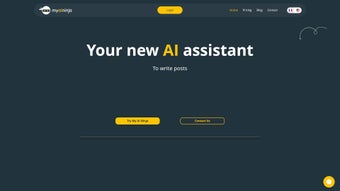

Download myAIninja – AI Writing Assistant for Social Media, Fast Content Creation
myAIninja is a web‑based AI writing assistant built specifically for social media marketers, content creators, and brand managers who need to produce high‑quality posts at lightning speed. Powered by cutting‑edge language models, the platform delivers automated content suggestions, ready‑to‑use templates, and platform‑specific optimizations that let you craft engaging captions, tweets, LinkedIn updates, and Instagram stories up to ten times faster than traditional manual writing. Because it runs entirely in the browser, myAIninja works on Windows, macOS, Linux, and even mobile devices, making it a truly cross‑platform solution for any team that wants to stay ahead of the content calendar without sacrificing creativity or brand consistency. This review dives deep into the core features, installation and usage workflow, compatibility, pros and cons, and answers the most common questions, so you can decide whether myAIninja is the right tool for your social media strategy.
Key Features That Power Efficient Social Media Writing
- AI‑Generated Content Suggestions: Instantly receive multiple copy options based on your brief, target audience, and preferred tone.
- Customizable Templates: Choose from pre‑designed layouts for Facebook, Instagram, Twitter, LinkedIn, and TikTok, then tweak them to match your brand voice.
- Platform‑Specific Optimization: The tool automatically adjusts character limits, hashtag density, and emoji usage to fit each network’s best practices.
- Batch Generation Mode: Create a week’s worth of posts in one session, with a single click to export to CSV, Google Sheets, or directly into popular scheduling tools.
- Brand Voice Consistency Engine: Upload style guides or sample posts, and the AI learns to replicate your unique phrasing, jargon, and tone.
- Real‑Time SEO & Engagement Scoring: Each draft receives a quick score indicating potential reach, readability, and SEO relevance.
- Collaboration Hub: Team members can comment, suggest edits, and approve content within the same browser window.
- Secure Cloud Storage: All drafts are saved encrypted on EU‑compliant servers, ensuring data privacy and GDPR compliance.
- Regular Updates & New Templates: Monthly content packs keep you aligned with emerging trends, seasonal holidays, and platform algorithm changes.
- Affordable Subscription Model: Tiered pricing (Starter, Pro, Agency) provides flexibility for freelancers to large enterprises.
Installation, Usage, and Compatibility – Getting Started in Minutes
Step‑by‑Step Installation
Because myAIninja is a SaaS (Software‑as‑a‑Service) product, there is no traditional download or installer required. Follow these simple steps to start creating content instantly:
- Visit myaininja.com and click the “Start Free Trial” button.
- Create an account using your email address or sign in with Google/Apple ID for single‑sign‑on convenience.
- Choose a subscription plan (you can begin with the 7‑day free trial to explore all features).
- Complete the quick onboarding questionnaire that asks about your industry, target audience, and preferred brand voice.
- Access the dashboard – the central hub where you can generate, edit, and schedule posts.
How to Use the Core Writing Workflow
Once you’re logged in, the interface guides you through a four‑stage process:
- 1. Select a Platform: Choose Facebook, Instagram, Twitter, LinkedIn, or TikTok. The system automatically loads the appropriate template.
- 2. Input Your Brief: Enter a short description of the campaign, key messages, any mandatory hashtags, and a desired tone (e.g., professional, witty, casual).
- 3. Generate Drafts: Click “Generate”. Within seconds, the AI presents 3‑5 variations. Each version shows a live engagement score and SEO preview.
- 4. Refine & Export: Edit the chosen draft directly in the editor, add images or links, then export to CSV, copy to clipboard, or push to your preferred scheduling tool via Zapier integration.
The platform also includes a “Batch Mode” where you can input a list of topics and let the AI produce an entire content calendar, complete with publishing dates and platform‑specific adjustments.
Cross‑Platform Compatibility
Since myAIninja runs in any modern browser (Chrome, Edge, Firefox, Safari), it works seamlessly on Windows 10/11, macOS Ventura and later, Linux distributions, as well as on mobile browsers for Android 8+ and iOS 13+. No additional plugins or extensions are required, making it ideal for remote teams that switch between desktop and mobile environments throughout the day. For power users, a Chrome extension is available that lets you generate AI‑enhanced captions directly from the social media site you’re visiting, further reducing context‑switching friction.
Pros, Cons, and Frequently Asked Questions
Pros & Cons – A Balanced View
- Pros:
- Speeds up content creation up to tenfold, freeing time for strategy work.
- Platform‑specific optimization reduces the need for manual adjustments.
- Brand voice engine ensures consistency across all channels.
- Collaborative workspace eliminates email‑based version control.
- Secure, GDPR‑compliant cloud storage protects sensitive campaign data.
- Regular template updates keep you ahead of trends.
- Cons:
- Requires an internet connection; offline use is not supported.
- AI-generated copy may need human polishing for highly technical topics.
- Higher‑tier plans can become costly for large agencies.
- Learning curve for teams unfamiliar with AI‑assisted writing.
FAQ – Answers to the Most Common Queries
Is myAIninja really free to try?
Yes, you can start a 7‑day free trial with full access to all premium features. No credit card is required to begin, and you can cancel anytime before the trial ends.
Can I use myAIninja for languages other than English?
The AI model supports multiple languages, including Spanish, French, German, and Portuguese. The quality varies slightly per language, but most users report satisfactory results for standard marketing copy.
How does myAIninja protect my brand’s confidential information?
All data is encrypted in transit (TLS 1.3) and at rest (AES‑256). The servers are hosted in EU data centers compliant with GDPR, and you can delete all stored drafts from the “Security” tab at any time.
Can I integrate myAIninja with existing social media scheduling tools?
Yes, myAIninja offers native integrations with Buffer, Hootsuite, and Later via API keys. Additionally, Zapier connections allow you to push content to virtually any marketing platform you use.
What support options are available if I encounter issues?
All subscription tiers include 24/7 email support. Pro and Agency plans receive priority live chat and a dedicated account manager. The knowledge base also contains video tutorials and best‑practice guides.
Conclusion – Is myAIninja Worth the Investment?
In the fast‑paced world of social media, the ability to generate high‑quality copy quickly can be the difference between a campaign that trends and one that stalls. myAIninja delivers on its promise of accelerated content creation while preserving brand voice, offering a suite of features that rival more complex, on‑premise solutions. Its web‑based nature ensures you can work from any device, and the collaborative hub keeps teams aligned without endless email threads. Although the subscription cost can add up for large agencies, the time saved—often measured in hours per week—typically outweighs the expense. For freelancers, small businesses, or any marketer looking to boost efficiency without sacrificing creativity, myAIninja presents a compelling, secure, and future‑proof option.
Ready to experience faster, smarter social media writing? Start your free trial today and see how AI can transform your content workflow.






